Description
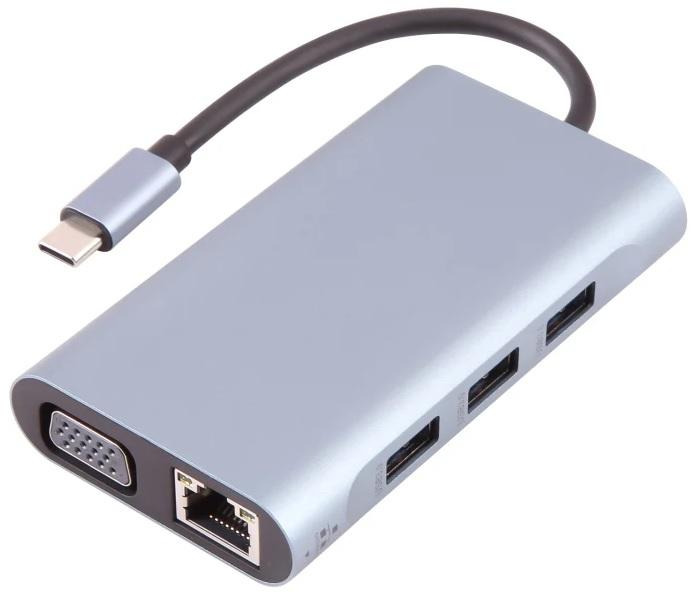
USB-C DOCK 7 IN 1 – 7IN1DOCK
Features
USB 1.1, 2.0 & 3.0 Compatible USB 3.0×3 Port
Power LED Indication
Support 4k x 2k(3840×2160) 30Hz HDTV+VGA
1080P
Support May 100w Power Adaptor (PD)
Support VGA+LAN Part 10/100/1000 Mbps
Interface: USB3.0x3, PDx1, HDTVx1, VGAx1, LANx1
Resolution: 3840×2160
Small and Portable: Small and Lightweight Design, does not take up much Space
Easy to put in Briefcases, Daily Backpacks, Luggage, etc., Very Suitable for Travel and Business Trips
Aluminum Alloy Shell Material, Fast Heat Dissipation and Wear Resistance.
Dual Video Output (Compatible with HDMI+VGA) Interface
Supporting 4K/30Hz and 1080P/60Hz High-Definition Picture Quality.
3 x USB3.0 Ports Data Transfer Rate up to 5Gbps
Plug and Play, no Driver Required
Disclaimer
This Docking Stations HDMI Video Output Requires The Host Laptops Type C Port To Support DisplayPort Alt Mode Or Thunderbolt 3/4 Video Output.
Hardware & Graphics Limitations:Most Gaming Laptops (including but not limited to Dell, Lenovo, HP, Acer, ASUS) use Hybrid Graphics (Integrated + Discrete GPU).
By Default, Type C Video runs on the Integrated GPU
When Switching to Discrete GPU-only (direct) Mode or High-Performance Mode, the Integrated GPUs Video Output may be disabled by the System, resulting in no HDMI Signal via the Dock, while USB Data Functions remain normal.
No Universal Compatibility:Not all Type C Ports Support Video Output. Some Low-End or Business Laptops are equipped with Data-Only Type C Ports (Marked SSOnly, no D or Thunderbolt Logo) that do not carry Video Signals at all.
User Responsibility: Before Purchase, Please Verify Your Laptops Type C Specifications And graphics Mode Settings With The Manufacturer.
We Do Not Guarantee 100% Compatibility With All laptops, And We Shall Not Be Liable For Any Incompatibility Issues Arising From The Laptops Hardware Design, BIOS/UEFI Settings, Or Graphics Driver Configurations.
Reviews
There are no reviews yet.